How I Extend Claude Code
I use Claude Code as my daily driver for coding these days, which offers a lot of extension points than make it easier to extend: CLAUDE.md, permissions, hooks, skills, subagents, MCP servers, plugins, a status line. I basically use all of them.
But there are two specific areas I missed a solution for:
- Loops that re-read everything. A skill running on a loop has no memory between ticks, so it keeps processing the same files it already went through, and the tokens go to re-reading instead of working.
- Rules that don’t stick.
CLAUDE.mdis prose sitting in a prompt. The harness can outrank it, and when it does the model ignores what I wrote and takes whatever approach it was told to take.
Neither has a good native solution, so ended up building solutions around that.
Worth saying up front that none of this is really Claude Code specific, and neither tool is tied to it either. Claude Code is just what I use every day.
A loop re-reads the same files every tick
/loop runs a skill on an interval. On my own repos it looks like this:
/loop 15m /glean /slop
/loop 15m /glean /simplify
/loop 15m /glean /polish
Ignore the /glean in the middle for a second, and picture what those three look like without it. Every tick hands the skill the entire uncommitted diff. If you have 100 changed files in the tree, the first tick reads 100 files, and so does the second one, and the third, even though nothing moved in 95 of them. The pass spends most of its budget re-reading work it already looked at, the session context fills up with the same files over and over, which is not a good way to spend tokens.
You can’t fix that from inside the skill, because the skill has no memory between ticks. It needs something outside it that remembers what it already saw.
That’s what glean solves. It gives each consumer its own baseline: /glean <skill> asks what changed since that skill last ran, invokes the skill on those files only, and marks them when it’s done. A file counts as changed when its bytes differ from the baseline rather than by timestamp, so a rebase or a branch switch doesn’t produce a phantom sweep of files that didn’t really move, and it also works with any agent call outside of the main executor. The baselines live in .git/glean/, which git doesn’t track, so nothing lands in history and each worktree gets its own.
Here’s steer’s own repo mid-session. slop swept 41 files a couple of hours ago, and two have moved since:
$ glean list --as slop
src/rules/compile.rs
src/rules/spec.rs

$ glean status
slop: 41 tracked, 2 changed, last mark 2h ago
So the next tick gets two files instead of 41. I’m not the one reading that, though. The skill asks glean what changed and works from the answer, and the last mark age is there so it can tell the difference between a consumer that finished a couple of hours ago and one that never started, which otherwise both show up as 0 changed.
Each consumer keeps its own position, which matters more than it sounds. When slop edits a file, simplify and polish haven’t seen those new bytes yet, so they pick it up on their next tick and re-check the thing that just changed. Three passes share one working tree, none of them redoes another’s work, and none of them has to know the others exist.
The other half of the problem is the loop’s own context. /glean runs the wrapped skill in a forked subagent, so the main loop grows by one line per tick instead of by every file the pass opened. A fifteen-minute loop wouldn’t survive a working day otherwise.
Instrutions are advisory, not enforced
The second problem is the one that annoyed me enough to write a second tool, and it got even worse with the latest models. It’ll write a whole Python program inline to change a single line in a file, or reach for sed -i, when the Edit tool does the same thing in one call, and most of the time is really hard to understand what’s going on while the model is working.
My CLAUDE.md is not that long, and most of it works, because a model that reads a rule usually just follows it and that costs nothing at runtime. But it’s prose sitting in a prompt, and it can be outranked. As for example, Claude Code’s auto mode injects a system directive telling the model to search with shell grep and read files with sed -n. My CLAUDE.md says the opposite, search with the fff MCP tools and read files with the Read tool, and the system directive wins every time.
Permissions don’t help here either. They decide whether a call may run, and that’s all they do, matching on the command string and answering yes or no. It takes five entries in my deny list to say “don’t read .env”, one per program, and that list stops working by the time the model decides to use bat to read it:
"deny": [
  "Bash(git add:*)",
  "Bash(git commit:*)",
  "Bash(git push:*)",
  "Read(**/.env*)",
  "Bash(cat **/.env*)",
  "Bash(head **/.env*)",
  "Bash(tail **/.env*)",
  "Bash(less **/.env*)",
  "Bash(more **/.env*)"
]
More to the point, “no” isn’t what I want most of the time. Bash(cat:*) and Bash(sed:*) are both in my allow list on purpose. I don’t want them blocked, I want them routed to the Read tool with the model told why.
The solution here is to extend Claude’s hook mechanism, specifically the PreToolUse hook, which is the last layer that still gets to decide, and it can hand back a modified input rather than just a verdict, which is exactly the shape of the thing I wanted. So instead of writing a bunch of scripts to deal with all the situations (which was what I started with), I’ve built steer to solve this. It parses the command into segments and either denies it with guidance the model reads, rewrites the input in place, or lets it through with context attached. One line in settings.json and the built-in rules are live:
"PreToolUse": [
  {
    "matcher": "*",
    "hooks": [
      { "type": "command", "command": "steer hook --event PreToolUse --agent claude", "timeout": 5 }
    ]
  }
]
steer check dry-runs a command through the rules, which is how I test one without waiting for an agent to try it:
$ steer check 'grep -rn "handler" src/'
command   grep -rn "handler" src/
segments
  head=grep args=["-rn", "handler", "src/"] pipeline_start=true in_workspace=true depth=0
matched   fff-over-grep  (block 0, parsed.segments[0])
action    deny
message
  Use the fff MCP tools instead of a shell search.

    mcp__fff__grep       search file contents for an identifier
    mcp__fff__find_files find files by name or topic
    mcp__fff__multi_grep several identifiers in one call
That message goes back to the model, which reads it and picks the right tool on the next turn. The two rules that fire most for me are that one and read-over-shell-pager, which catches sed -n, cat -n, cat file | head and the rest of the ways to ask for a line range, and both of them exist purely because auto mode tells the model to do the opposite. Where the correction is only a flag, steer splices it in instead of spending a turn on a refusal the model then has to react to:
$ steer check 'rm -rf dist'
matched   trash-over-rm
action    rewrite
rewrite   trash dist
message
  steer: `rm` becomes `trash` so the delete stays recoverable.
What a rule looks like
That’s the rule behind the deny above, trimmed to one of its three match blocks:
[[rules]]
name = "fff-over-grep"
description = "Shell searches over indexed paths belong to the fff MCP tools."
tool = "shell"
agents = ["claude"]

[[rules.match]]
any = "parsed.segments"
head = { any_of = ["grep", "egrep", "fgrep", "rg", "ag", "ack", "ack-grep", "ugrep"] }
pipeline_start = { is = true }
in_workspace = { is = true }
args = { none_glob = ["node_modules*", "*/node_modules*"] }

[rules.action]
kind = "deny"
message = """
Use the fff MCP tools instead of a shell search.
..."""

[rules.test]
fires = ["grep -rn foo src", "git grep -n RecordStore", "find . -name '*.tsx'"]
ignores = ["gh pr list | grep foo", "find . -name '*.log' -delete", "rg -n lib node_modules/@scope", "grep -rn foo /usr/local/include"]
I added a lot of more examples to the repo that can be used for many other cases, like avoiding it to read secrets, running commands into production, forbidding to run dangerous commands and many others.
The status line
Not a problem I had to solve, but worth a mention since it’s the extension point with the lowest effort to payoff ratio. Claude Code offers a customized status line interface that you can use to show any information you want.
I wrote statusline for mine. It shows the model, context usage, session duration, input and output tokens, and the part I actually care about, which is the 5-hour and 7-day usage limits with their reset countdowns:
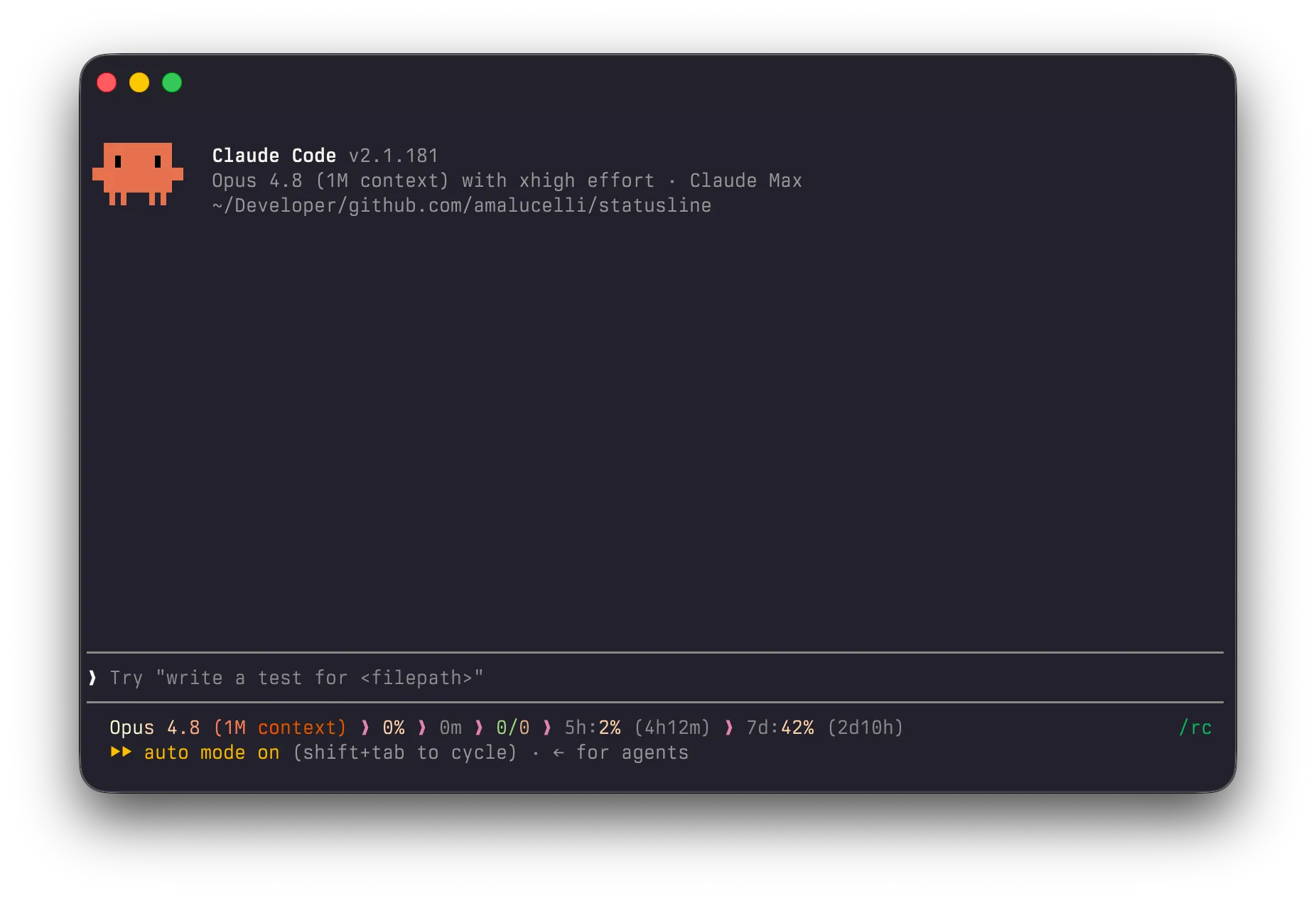
Wiring it up is one entry in settings.json:
"statusLine": {
  "type": "command",
  "command": "statusline",
  "padding": 0
}
On a subscription those two windows are the real budget, and seeing that there’s twenty minutes left in the 5-hour one is what decides whether I kick off a long task now or go do something else first. This one is built for my setup rather than as a general tool, so fork it and change what it shows.
Try them
All three are single Rust binaries, and can be installed using Homebrew:
brew install --cask amalucelli/tap/steer
brew install --cask amalucelli/tap/glean
brew install --cask amalucelli/tap/statusline
steer needs the hook line above and nothing else, since the built-in rules are compiled into the binary. This is not tied to Claude Code ecosystem, and also speaks fifteen other harnesses, including Codex, Cursor, Opencode, Pi and others. glean ships as a Claude Code plugin, but it’s harness agnostic and can be wired up to any harness.
/plugin marketplace add amalucelli/glean
/plugin install glean@glean